Cancelling your Gym membership
How to cancel or resume a Sales Gym membership, what happens to your access, and what a failed payment means.
4 min read
Before you start
- An active Sales Gym membership
Tip
Cancelling early costs you nothing extra, since you keep access until the end of the month you already paid for.
Your Sales Gym membership renews monthly until you cancel. This article covers how to cancel, what you keep afterward, how to change your mind, and what happens if a payment fails.
How to cancel from the Gym
Step 1. Open the Gym
Open The Gym from the sidebar.
Step 2. Open the Member menu
Click the Member chip at the top of the page. It shows your renewal date and opens a menu.
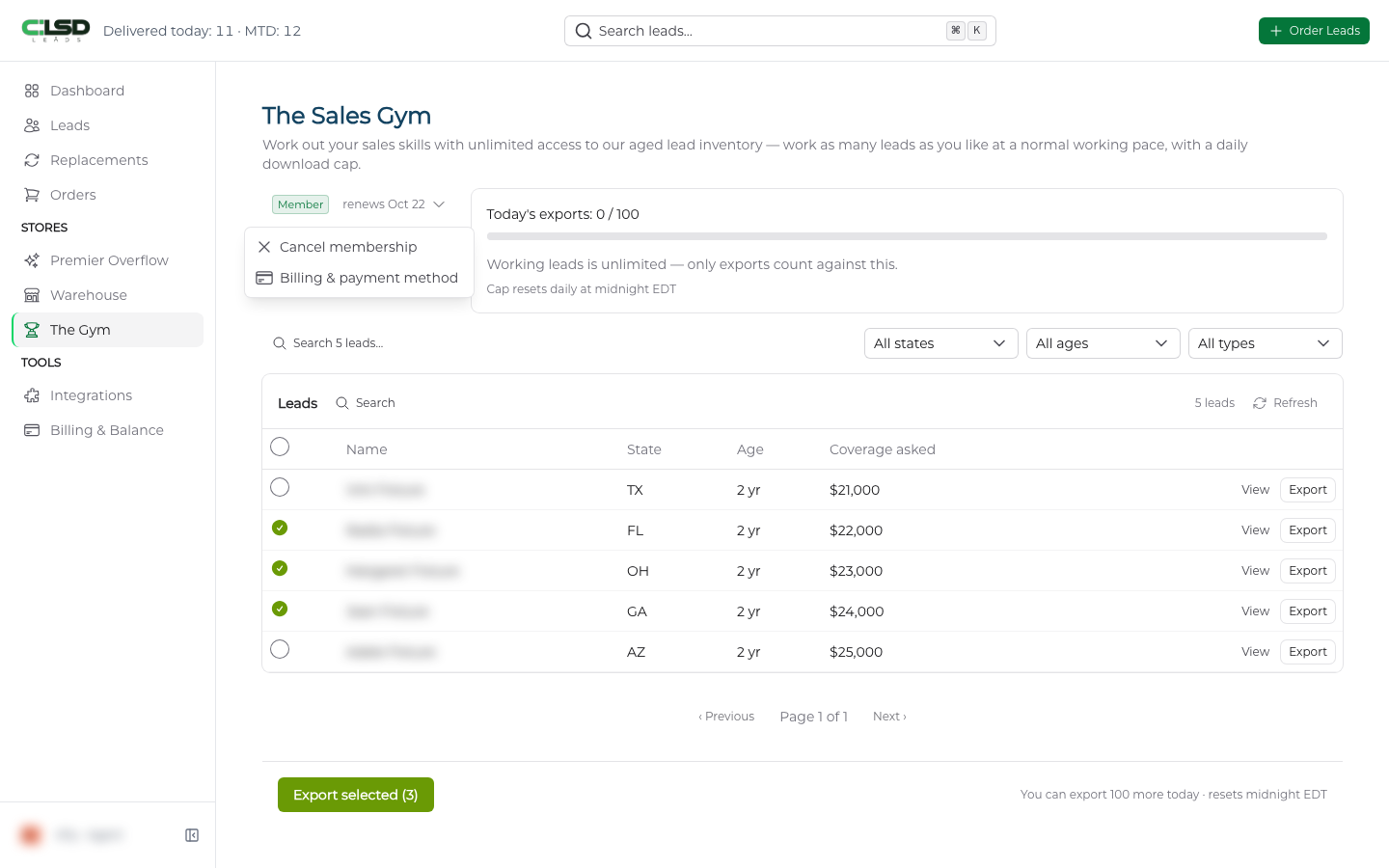
Step 3. Choose Cancel membership
Choose Cancel membership.
Step 4. Confirm
A dialog headed Cancel your Sales Gym membership? tells you the date your access runs to. If a payment is outstanding, it says instead that your membership ends on that date and will not renew, and that if the payment goes through you are back in the Gym until then. Click Cancel membership to confirm, or Keep my membership to back out.
The chip then reads ends with the date instead of renews.
How to cancel from Billing & Balance
Open Billing & Balance from the sidebar. Your membership appears as a Sales Gym Membership card with its status (Active, Ending or Payment due) and the renewal date. An Ended membership shows under the Cancelled tab at the top of the page. While the membership is active the card also carries a Manage in the gym link back to the Gym page. Click Cancel membership on the card and confirm in the same dialog.
You can also cancel by emailing support@clsdleads.io from the email address on your account.
What happens when you cancel
- All future charges stop. There is no cancellation fee.
- It takes effect at the end of the month you have already paid for. Until then you can browse and export as normal.
Warning
Fees already charged are not refunded, and we do not refund part of a month. You keep the access instead.
The full terms are in the Refund Policy and the Terms of Service.
Changing your mind
Until the end date passes you can undo it. In the Gym, open the Member chip menu and choose Resume membership. On the Sales Gym Membership card in Billing & Balance, click Don't cancel. Your membership then renews on the original date.
Once a membership has ended, you can join again from the Gym page. That starts a new membership and a new charge.
If a payment fails
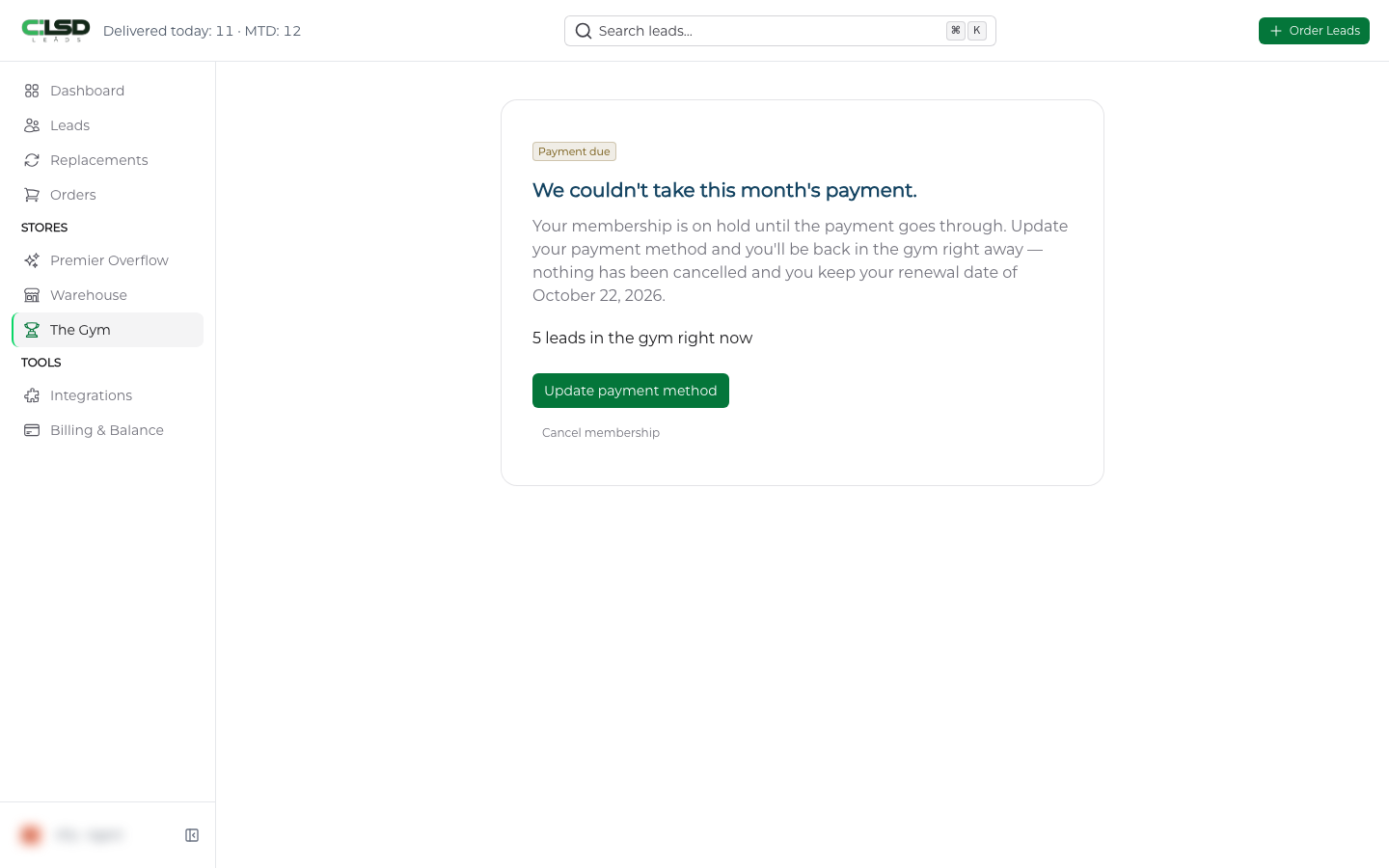
If we cannot take a month's payment, the Gym page shows a Payment due badge and the heading We couldn't take this month's payment. Your membership is on hold and you keep your renewal date, but nothing in the Gym can be opened or exported until the payment goes through.
- Click Update payment method to go to Billing & Balance. On the Sales Gym Membership card, click Retry payment, or Use a different card first to pick another one.
- Or click Cancel membership on either page to end it instead.
Important
A hold for non payment does not extend the period you have paid for.
Troubleshooting
The Gym page says it is closed right now
We have taken the Gym offline. The page is headed The gym is closed right now. with a Closed badge. It tells you your membership is still being charged each month, gives you a Cancel membership button unless you have already cancelled, and links to Billing & payment method.
What happens if CLSD ends my membership?
If we remove you for misuse (automated collection, bulk extraction, sharing your login and resale of lead data), access ends at once and the rest of the month you paid for is not refunded. If we end it for any other reason and you have not breached the Terms, your membership either runs to the end of the paid period or we refund the unused part to the card you paid with, and we tell you which at the time.
A refund is due and has not arrived
This applies when we ended your membership for a reason other than a breach and told you the unused part is being refunded. Give it ten business days. If it still has not arrived by then, email support@clsdleads.io.