Billing and balance
What each section of your billing page shows and where to go for the things you can change there.
4 min read
Before you start
- A CLSD account you can sign in to
Tip
The same Billing & Balance link is in the user menu at the bottom of the sidebar, so you can reach it from any page.
Everything to do with money on your account lives on one page. This article covers what is on it and what each part means.
Getting there
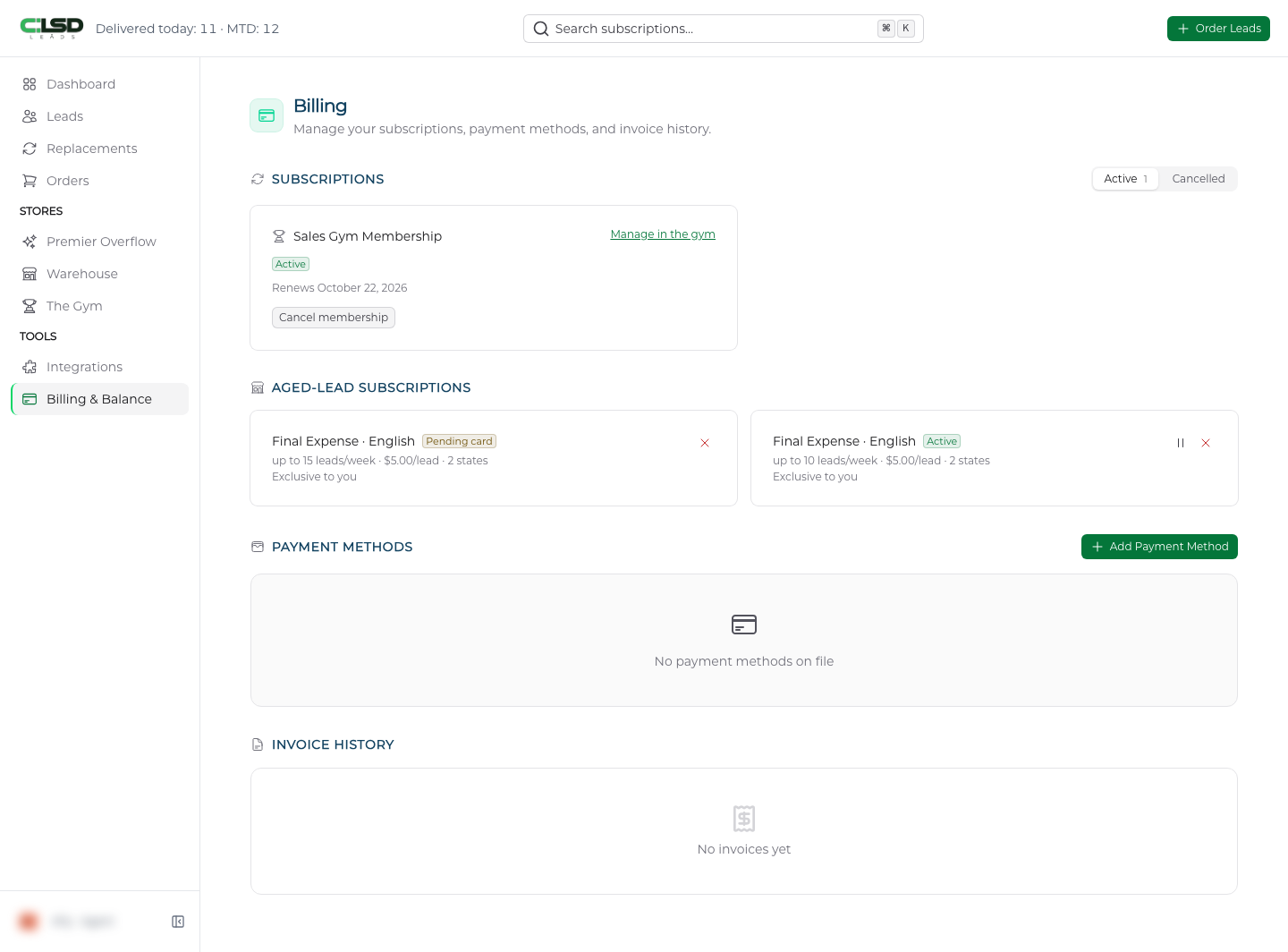
Click Billing & Balance in the left sidebar, under Tools. The same link is in the user menu at the bottom of the sidebar. The page heading reads Billing, with the line "Manage your subscriptions, payment methods, and invoice history."
Subscriptions
The first section lists every recurring charge you have, split into two tabs, Active and Cancelled. The number next to each tab is how many are in it.
Each weekly lead subscription is a card with the lead type, a status badge, and three figures. Leads/week, Language and Weekly total. If you took a commitment discount you also see a badge beside the status that reads your percentage off, and Commitment progress as weeks completed out of weeks committed. The states it covers appear as small badges, the first three by name and the rest as a count. Under that is the date of your next charge, the date you cancelled, or Discount penalty until with a date if you cancelled inside a commitment.
The status badge is Active, Retrying or Cancelled.
Note
Retrying means the last charge did not go through and your card is being tried again, so the payment may still succeed.
Each active weekly subscription card carries the buttons Edit, Fast Forward and Cancel. Each one is covered in Subscriptions, pausing and cancelling.
If you have nothing recurring, the section reads "No active subscriptions" with a Start a Subscription button that takes you to your orders.
Sales Gym membership
If you have a Sales Gym membership it appears first in this list as Sales Gym Membership, with a status of Active, Ending, Payment due or Ended and a line such as "Renews" or "Access ends" with the date. In the Active state its card has a Manage in the gym link and a Cancel membership button instead. The other states swap those for the control that state needs, which is covered in Cancelling your Gym membership.
Aged-Lead Subscriptions
This section appears once you have had a weekly aged lead subscription, and it keeps showing paused and cancelled ones alongside active ones. There are no tabs here. Each card shows the lead type and language, a status badge, a line with the most leads it will send per week, the price per lead and how many states it covers, and under that its exclusivity label. The small buttons on the right pause, resume or cancel it. See Weekly aged lead subscriptions.
Payment Methods and Invoice History
Payment Methods
Your saved cards, shown as card images with the brand, the last four digits and the expiration. One is marked Default. The Add Payment Method button opens a secure card form. Until you save a card the section reads "No payment methods on file". Adding, switching and removing cards is covered in Managing payment methods.
Invoice History
A table of every charge made to your account, with Date, Description, Amount, Status and Actions. Most rows carry a PDF button to download the invoice and a View button to open it online. A Load more button at the bottom brings in older rows. Details are in Invoices and receipts.
Frequently asked questions
Is there a balance to top up?
No. There is nothing to top up and no prepaid balance to spend. Each purchase is charged to a card when you make it, and each recurring product charges your card on its own schedule. If you prepaid for a Premier order we have not filled, that money stays yours, and the Refund Policy covers whether it comes back as a refund or a credit. Refunds puts that policy in plain words.
Why is there no Aged-Lead Subscriptions section on my page?
It appears once you have had a weekly aged lead subscription. From then on it stays, with paused and cancelled ones alongside active ones.
Why does Invoice History say there are no invoices yet?
A brand new account sees "No invoices yet" until its first purchase.