Closing your account
How to close your CLSD account, what is removed, and which records we are required to keep.
3 min read
Before you start
- Access to the Profile page of the account you want to close
- No active subscriptions left on the account
- Your leads exported, if you want to keep them
Tip
If you only want some information removed, the privacy request form does that without closing the account.
You start closing your account from the Profile page, and our support team finishes it. This article covers what to do first, the steps, and what happens to your orders, leads, subscriptions and billing records.
Before you delete
Warning
Deleting your account does not cancel a subscription on its own, and once the account is closed you will not be able to sign in again.
Cancel any active subscription first, following Subscriptions, pausing and cancelling. Download any leads you want to keep. See Viewing and exporting your leads.
Deleting the account
Step 1. Open your profile
Open the user menu at the bottom of the left sidebar and choose Profile.
Step 2. Click Delete Account
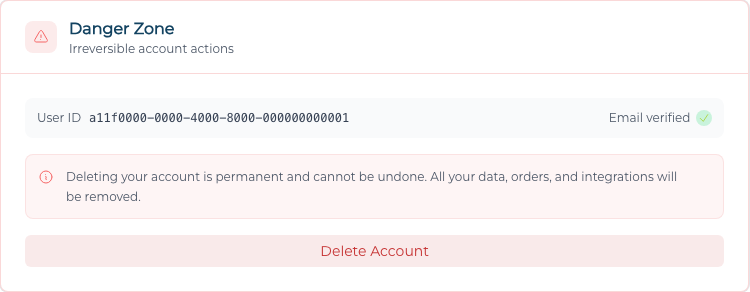
Scroll to the red Danger Zone card. It reads "Deleting your account is permanent and cannot be undone. All your data, orders, and integrations will be removed." Click Delete Account.
Step 3. Confirm your email address
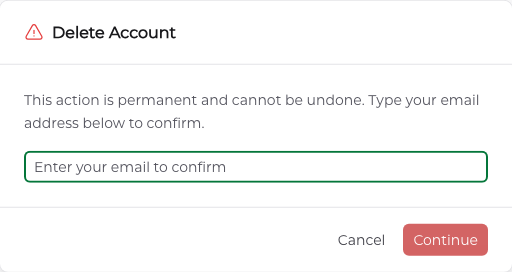
In the Delete Account window, type your email address exactly as it appears on your profile. The Continue button stays grayed out until it matches.
Step 4. Ask support to finish
The window then asks for a verification code. This step needs an authenticator app set up on your account, and there is no way to set one up yourself yet, so contact support and we will close the account for you. Once it is closed you are signed out and the account cannot be reopened.
What is removed, and what we keep
What is removed
Your name, email address, phone number, NPN, calling number, photo and licensed states are erased. Your delivery destinations (email, Google Sheets, LeadConnector) and any team role are removed. You can no longer sign in with the account.
What we keep, and why
The Privacy Policy sets the retention periods, and deleting your account does not shorten them.
Your orders, subscriptions, invoices and payment records stay on file. The policy keeps "transaction, order, invoice, and payment records" for "seven (7) years from the transaction, for tax, accounting, and audit purposes." They are no longer tied to your name.
Leads are not deleted. A lead record is about the consumer who submitted the inquiry, so deleting your account does not remove the leads you bought or the record of which leads were delivered on which order.
If you asked us to stop selling your information, that instruction survives the deletion in a form that cannot identify you.
The policy also notes that "some information, such as past transactions or other information, may not be deleted" and that complete removal may leave "some residual information due to our backup procedures."
Troubleshooting
The Continue button stays grayed out
The email address you typed has to match the one on your profile exactly. Check it against the Email Address field on the Profile page.
The window is asking for a verification code
That step needs an authenticator app set up on your account, and there is no way to set one up yourself yet. Contact support and we will close the account for you.
Will deleting my account cancel my subscriptions?
No. Deleting your account does not cancel a subscription on its own, so cancel each one first from Billing and balance.
I only want some information removed
To have specific information removed, or to opt out of sale without closing the account, use the form described in Privacy requests and do not sell.