How aged lead pricing works
What sets the price of a Warehouse lead and where to see the current price before you buy.
4 min read
Before you start
- The Warehouse store open, so you can see the live chip prices while you read
Tip
Switch the lead type or the language toggle and watch the chip prices update before you add anything.
Warehouse leads are priced by age band, lead type and language. This article explains the structure and where the current prices appear.
Three things set the price
- The age band. Every lead in the Warehouse falls into a band based on how many days old it is. Age counts from the day the lead was generated, not from when it reached the store. The bands appear as chips at the top of the store. Right now they are 31-90 days and 91-180 days.
- The lead type. Each type has its own price for each band. Pick one under Type and the chip prices update.
- The language. English and Spanish leads of the same type and band are priced separately. Switch the toggle to see the other set.
Older bands are priced below younger ones. The longer a lead has sat, the less it costs.
Where the current price appears
Prices are set per band and can change, so this article does not list them. The store shows the live price wherever a lead can be bought.
- On each age chip, next to the band label.
- In the Add to cart panel, beside each band's count.
- On each cart card, as the band price and the line total.
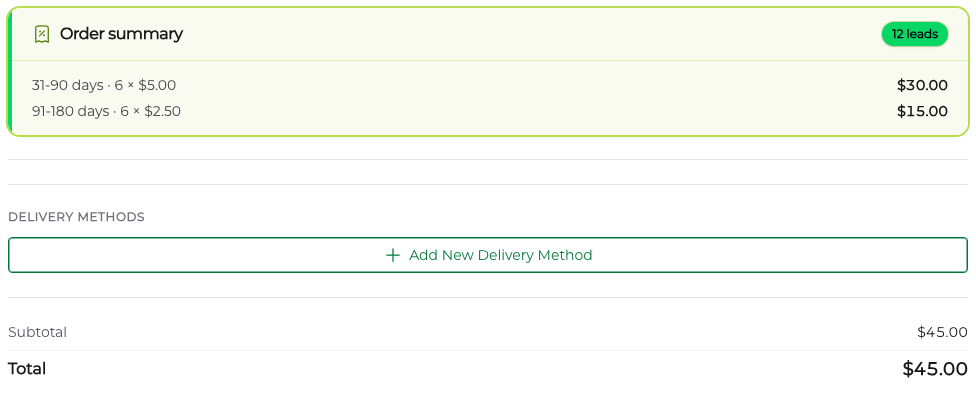
- In the checkout drawer under Order summary, as the band, the count and the price per lead, with Subtotal and Total below. The drawer lists states by their abbreviation.
- On the order page afterwards, under Per-tier breakdown, with the Grand Total at the bottom.
A lead type we cannot price for every band is held out of the store, and the store says it is restocking instead.
Note
The price you pay is the price shown at checkout. If a band's price changes later, your order keeps the price it was charged.
No quantity breakpoints
Warehouse pricing has no volume tiers. One lead or a hundred, the price per lead is the band price. Premier orders work differently, with a lower price per lead at larger quantities. See How pricing breakpoints work.
Warning
There is one floor. A checkout whose total falls below the minimum charge amount is refused, so a single very cheap lead may not go through on its own.
The one discount in the Warehouse is the offer that can appear after you pay for a Premier order. It takes a set amount off each lead, and the panel shows the amount. See Buying aged leads in the Warehouse.
Frequently asked questions
The chip price changed since I last looked. Which price do I pay?
The price shown at checkout. Band prices can change, and the chips always show the live price. Once you have paid, your order keeps the price it was charged, whatever the band does afterward.
Why was my checkout refused?
The total fell below the minimum charge amount. There are no volume tiers in the Warehouse, but there is a floor, so a single very cheap lead may not go through on its own. Add another lead and try again.
Where do Premier Overflow leads fit?
Leads from Premier orders that were never delivered to another agent through a Premier order are sold in Premier Overflow, in younger age bands with their own prices. See Buying Premier Overflow leads. Once a lead passes the oldest Warehouse band, it leaves the store.
Does a weekly subscription use the band prices?
No. A weekly aged lead subscription has one price per lead, set when the subscription is created and shown on the activation page and on your billing page. See Weekly aged lead subscriptions.