How pricing breakpoints work
How the per lead price drops as your quantity grows, the five state minimum, and how coupons apply.
5 min read
Before you start
- The order form open at the Order Details section
Tip
Nudge the Quantity up one step at a time and watch the rate line under it, since crossing a breakpoint drops the price on every lead in the order.
Premier leads are priced per lead, and the price per lead drops at set quantities. This article explains the rule and where to see the current numbers. It also covers the state minimum and coupons, since both come up at checkout.
The rule
Each lead type has a short ladder of price tiers. Every tier has a minimum quantity and a price per lead. When you set a quantity, the tier with the highest minimum your quantity meets is the one that applies, and it applies to every lead in the order, including the leads below the breakpoint.
Say a type has tiers at 25, 50, and 100 leads. An order of 75 leads meets the 25 minimum and the 50 minimum, so the 50 tier price applies to all 75 leads. An order of 100 moves the whole order to the 100 tier price.
Note
Prices and breakpoints are set per lead type and they change from time to time, so this article does not quote them. The current price per lead for your quantity is shown on the order form, and the lowest price for each type is shown on the home page under Lead Packages as As low as (a type without a price yet reads Pricing coming soon).
Watching the price change on the form
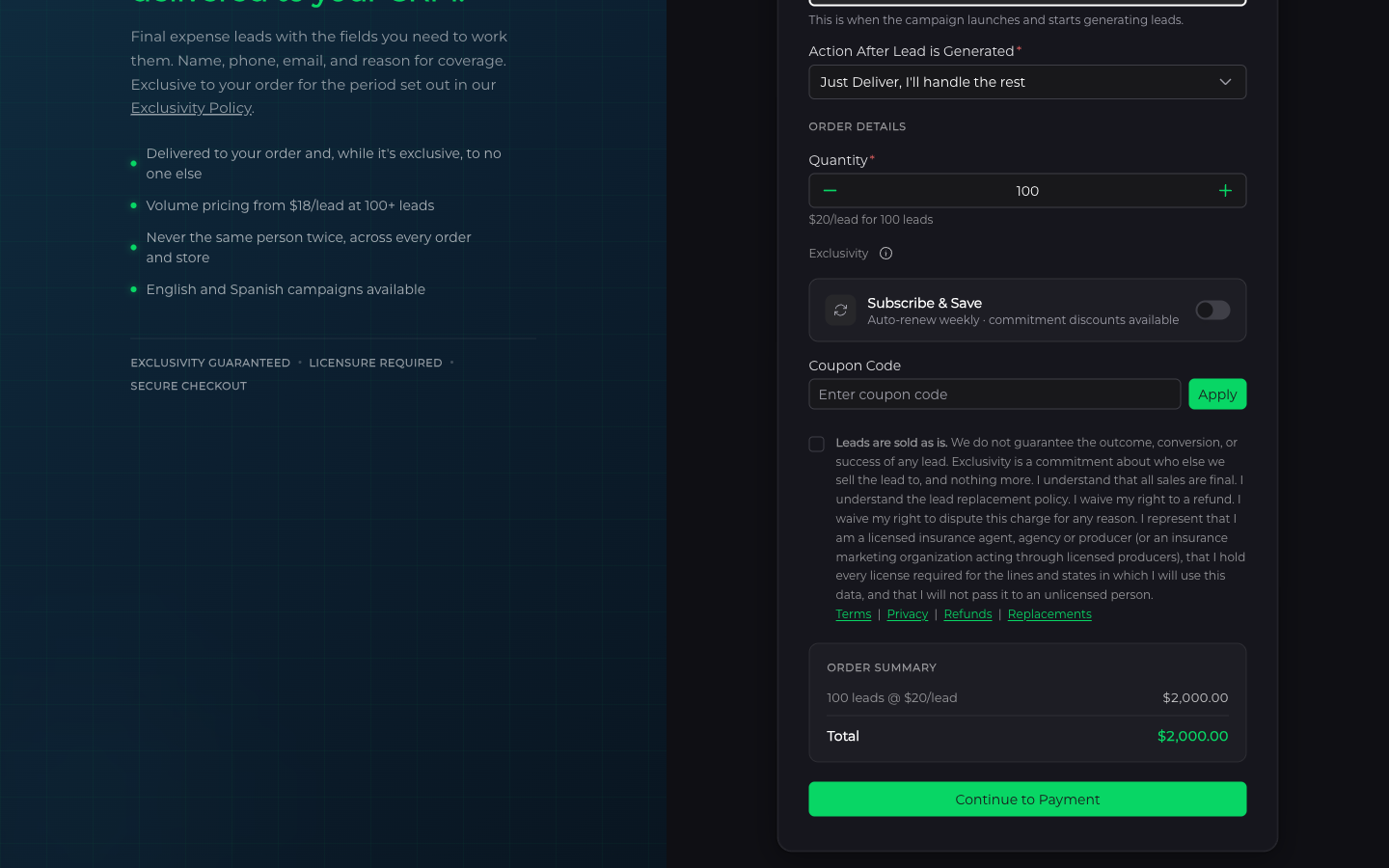
Under Order Details, the Quantity field moves in steps of 25, from 25 up to 500. Directly under it you will see the live rate, for example $X/lead for 100 leads. Change the quantity and the rate updates. If you cross a breakpoint the per lead number drops.
The Order Summary at the bottom lists what you are paying for. In the signed in form the first line is Leads Ordered, your quantity at the per lead price. On the public page the same line reads as the quantity at the per lead rate. Either way, that per lead figure already includes the Spanish rate when you order in Spanish. Spanish orders in the signed in form also show a Spanish Surcharge line. It breaks out the part of the per lead price that is the surcharge, so it is already inside Leads Ordered and is not added to Total a second time. Then comes any discount, then Total. See Choosing a lead type for how the language choice works.
The five state minimum
Every Premier order needs at least five states. On the public order page the States field says so in its placeholder, Select at least 5 states..., and if you try to continue with fewer you will see Please select at least 5 states. Signed in, the field reads Select states... and the form refuses to continue with fewer, showing Select at least 5 states. This is checked again when the order is created, so there is no way around it from any form.
More states give your order more places to generate leads from. Your licensed states are filled in for you when you are signed in, and you can add or remove states on each order.
Coupons
Under Order Details there is a Coupon Code field with an Apply button. Enter the code and click Apply. If it is valid, the form shows the code and how much it saves. On the public page a Discount line with the code appears in the Order Summary. In the signed in form the Order Summary line is labeled Coupon followed by the code, and the payment step shows it as Discount. The Clear button next to the code removes it.
Some coupons require a minimum quantity. If your order is below it, the form tells you how many leads the coupon needs and the discount does not apply until you reach that number.
Important
Coupons cannot be combined with other offers unless we say otherwise, per our Refund Policy.
Frequently asked questions
Does the lower price apply to the whole order or only the leads past the breakpoint?
The whole order. The tier with the highest minimum your quantity meets sets the price for every lead, including the ones below the breakpoint.
What exactly is my card charged?
The Total in the summary. If you change the quantity before paying, the per lead rate is recomputed and the total updates with it.
My coupon shows on the form but the discount is zero. Why?
The coupon has a minimum quantity and your order is below it. The form tells you how many leads the coupon needs. Raise the quantity to that number and the discount applies.
Where did the coupon field go?
The coupon field is hidden when Subscribe & Save is turned on, because weekly subscriptions use commitment discounts instead. See Billing and balance.