Tracking your replacement requests
How to read the Replacements page, what each status means, and what happens on your order after a request is approved or denied.
3 min read
Before you start
- A replacement request you have already filed
Tip
Use the search box above the table to jump to one request by the lead's name or the order number.
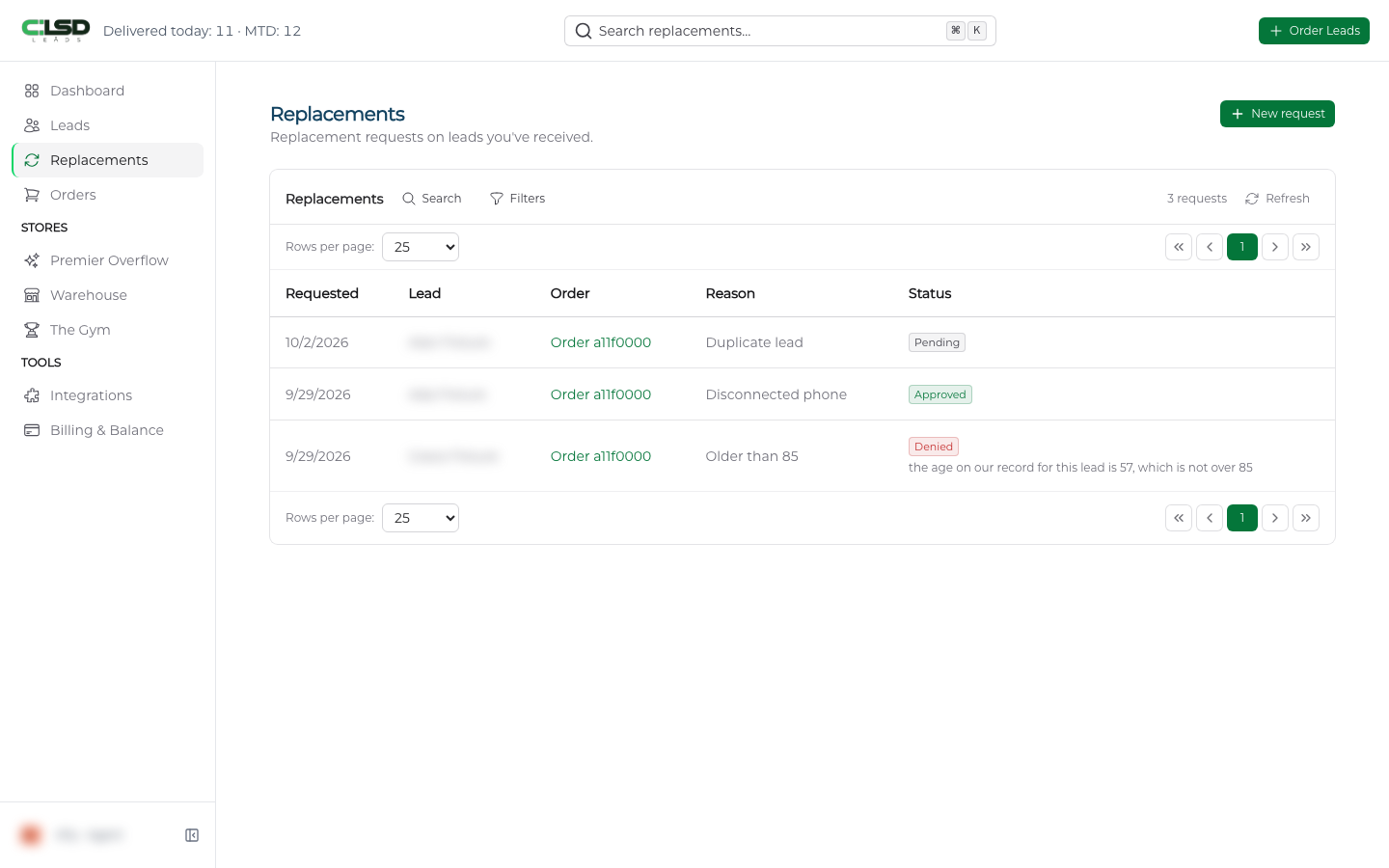
Every replacement request you have filed is listed on one page, Replacements in the left sidebar. This article covers how to read that page and what each outcome means for your order.
The list
Each row is one request.
| Column | What it shows |
|---|---|
| Requested | The date you filed the request. |
| Lead | The name on the lead. |
| Order | A link to the order the lead came on, labeled with the word Order and the first part of its number. Click it to open the order. |
| Reason | The reason you picked in the form. |
| Status | Pending, Approved, or Denied. |
Requests still waiting on a decision sit at the top, oldest first. Decided requests follow, newest decision first.
If you have never filed a request, the page reads No replacement requests yet. with a New request button and a View my orders button.
Statuses
- Pending. We have your request and it is under review.
- Approved. The lead is being replaced. See below for what changes on your order.
- Denied. The lead did not qualify. The reason appears as a note under the status, and hovering over the status shows the same note.
Note
Once we decide, the new status can take a short while to appear. A request we have already approved or denied may still read Pending for a bit.
Finding one request
The search box above the table (Search replacements...) matches the lead name, the reason, the status, and the order number. Click Filters to narrow by Status, Reason, Requested From, and Requested To. The count beside the buttons tells you how many requests match. Clear removes every filter. Rows per page lets you show 25, 50, or 100 requests at a time.
After a decision
Approved. The replaced lead stops counting toward your order. On the order page Delivered drops by one and Remaining rises by one, and the open spot is filled by another lead through your order, the same way the rest of your leads arrive. In the lead's Actions menu the replacement entry reads Replacement approved.
Denied. Nothing changes on the order. The lead keeps counting toward it, and the Actions entry reads Replacement denied. If you think the decision missed something, contact our team through Getting support.
Important
A lead carries one request, so once it has been decided the request action stays closed for that lead.
To file a new request, see Requesting a replacement.
Frequently asked questions
Why does my request still say Pending?
Either we are still reviewing it, or we have decided and the page has not caught up yet. A decision can take a short while to appear. Check back a little later.
Why was my request denied?
The lead did not qualify under the Lead Replacement Policy. The reason is in the note under the Denied status, and hovering over the status shows the same note. If you think the decision missed something, contact our team through Getting support.
Can I request a second replacement on the same lead?
No. A lead carries one request. Once it has been decided, the request action stays closed for that lead, whichever way the decision went.