Invoices and receipts
Where to find the invoice and receipt for every charge, what you can download, and what the online invoice page is.
3 min read
Before you start
- At least one charge on your account
Tip
Click Load more at the bottom of the Invoice History table if an older charge is missing from the list.
Every charge to your account has an invoice, and every paid charge has a receipt. This article shows the two places to find them.
Invoice History on the Billing page
Open Billing & Balance from the sidebar and scroll to Invoice History. The table lists every charge, newest first, with five columns.
| Column | What it shows |
|---|---|
| Date | The day the invoice was created. |
| Description | What the charge was for, taken from the invoice itself. When an invoice carries no description, the column reads "Subscription charge". |
| Amount | What was paid, or what is due if it has not been paid yet. |
| Status | The payment status. One of paid, open, draft or void. |
| Actions | The PDF and View buttons, where they are available. |
The PDF button downloads the invoice as a file you can keep or send to your bookkeeper. The View button opens the invoice online in a new tab.
Note
The online invoice page is hosted by Stripe, our payment processor, and shows the same line items and status as the PDF.
If you have older invoices than the page loaded, click Load more at the bottom to bring them in. A new account that has not bought anything sees "No invoices yet".
Invoice and receipt for a specific order
If you are looking at a particular order, you can get its documents from the order itself. These two entries appear on paid Premier orders.
Step 1. Open your orders
Open Orders from the sidebar.
Step 2. Open the row's menu
Find the order and click Actions at the end of its row.
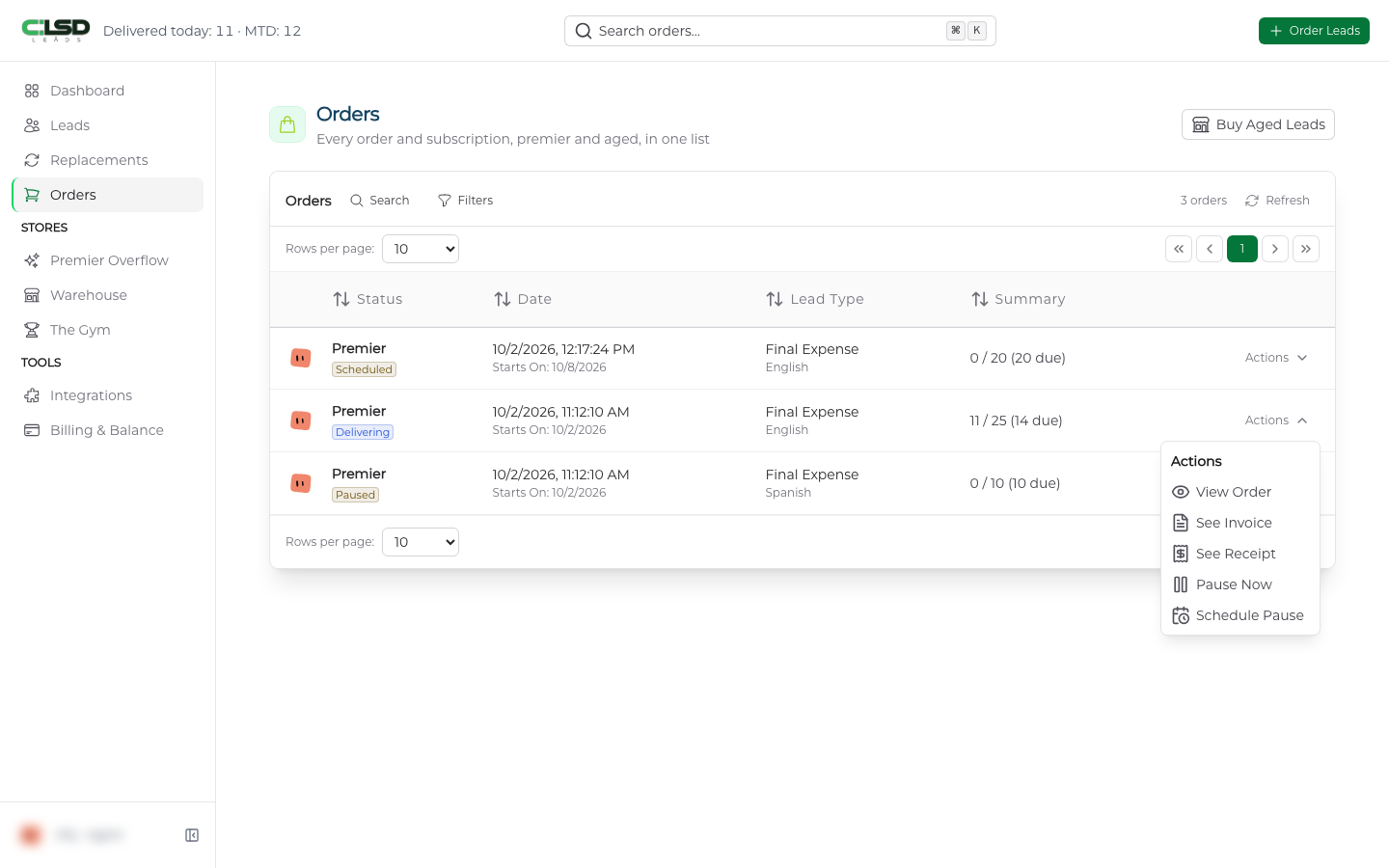
Step 3. Choose the document
Choose See Invoice or See Receipt. Both open in a new tab.
What is the difference?
An invoice is the bill. It lists what you bought and the amount, and its status moves from open to paid.
A receipt is proof the payment went through. For an order, See Receipt opens the paid invoice, which is the record of payment, or the card receipt where there is no paid invoice.
Troubleshooting
A charge on my card statement is not in my invoice history
Contact support with the date and amount and we will track it down.
The order's menu has no See Invoice entry
An order from the Warehouse or Premier Overflow has no invoice entry in its menu, so use the Invoice History table on the Billing page for those. If no document can be found for a Premier order you see a message saying so, and the invoice table is the next place to look.
A row has no PDF or View button
A draft invoice has neither button yet.